Tuesday, April 27, 2010

Hello, Android!

Hello, Android!

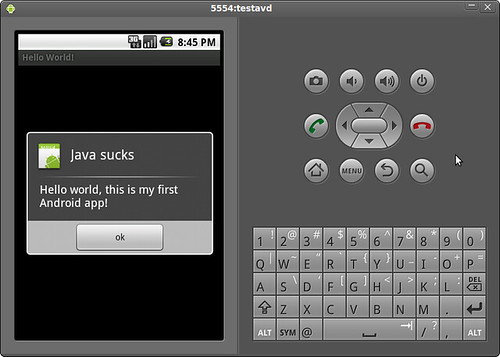
Yay, this is my first Android app! Java is really slow especially if you use Eclipse for development.  I tried this on an amd64 machine with 2GB of RAM but this simple app still crawls to a halt.  Anyway, I wish I can try this on a real phone.

Friday, February 19, 2010

Moblin, Eeebuntu 4.0 beta, etc

Just got back from Cebu GNU Linux Users Group meeting. I saw someone using Moblin. Three thumbs up! The UI is very intuitive, and will have no problems with mainstream customer adoption.

Meanwhile, Eeebuntu 4.0 is not even ready for early adopters. The installation stopped somewhere at around 95% and complained about failed GRUB setup. I'm currently downloading Ubuntu 9.10 Netbook Remix because my Eee is left with a broken OS. Let's see how this goes.

Monday, February 08, 2010

FreeBSD on Eee

I've managed to install FreeBSD 8.0 on my Eee. I was planning to install NetBSD 5.0, but I found out that I had to convert the ISO to a memory stick image before I can dd it. For some reasons, unetbootin doesn't work with NetBSD's ISOs. There's a script that converts NetBSD ISOs to memstick images, but it seems that it only works on an existing *BSD system. I could have just SSH'd into a remote NetBSD system so that I can run the script there, but I realized that the output would be too big. SSH access is a privilege and not a right; abusing it with large file transfers is a big no-no.

I tried to manually create an image using Mac OS X, but I couldn't initialize my USB stick's MBR (i.e., I couldn't boot from the USB). It says that it couldn't find "/usr/standalone/i386/boot0". I searched for it at the Mac OS X' original install discs, but I couldn't find it there either.

It is possible to install NetBSD using Mac OS X, but I was like, FreeBSD is already available as a memstick image from its FTP site. Why not use it? Thus, I downloaded it, dd'd it to my USB stick, and installed it on my Eee. Everything was straightforward.

Straightforward is boring. I'll try to recompile the kernel to see if I can further reduce its boot time (it boots less than 20sec from GRUB to login). I strongly suspect that I'll just reduce its space but not its boot time, but I'll never know until I try. I'll also try to install NetBSD via PXE, once I'm done playing with FreeBSD. I haven't tried doing it yet.

Saturday, February 06, 2010

Eeexperiments

Moblin

I've finally got around installing Moblin. I've copied the image to a USB stick and attempted to boot the OS. The boot process didn't continue though. I got the following error:
/dev/sda does not contain a rootfs
/dev/sdb does not contain a rootfs
/dev/sdc does not contain a rootfs
/dev/sdd does not contain a rootfs
I might try tweaking the kernel configs some time to see if it would work. Meanwhile, I'll just install NetBSD.

Boot Booster

Eee's BootBooster reduced the boot time by skipping the pre-boot sequence. Eeebuntu wasted installed a swap partition when I first installed it, but I never used it because I know that swapping would increase the number of writes to my Eee's SSD. Increasing the number of writes would shorten its life span. Thus, I deleted my swap and installed an EFI partition in its place. Once the BIOS detected the new partition, the BootBooster option magically appeared.

coreboot

A quick googling revealed that coreboot is unsupported on an Eee PC 701. I've also stumbled upon flashrom's source code (Linux bios flasher), and it explicitly stated that Eee PC 701 has been verified to be unsupported. Oh well.

Wednesday, January 27, 2010

HOWTO Let lighttpd listen to both IPv4 and IPv6 on *BSD.

Okay, I've managed to let lighttpd listen to both IPv4 and IPv6 requests without using IPv4-mapped addresses. According to an Internet draft, IPv4 mapped addresses are considered harmful (R.I.P., itojun :). This has already been turned off in *BSDs by default but not in Linux.

Anyway, I've found out that if sysctl net.inet6.ip6.v6only is set to 1, enabling IPv6 in lighttpd would cause it to listen to IPv6 only. To solve this, you need to use these settings:
server.use-ipv6 = "enable"
$SERVER["socket"] == "0.0.0.0:80" {
}
If you need to use SSL, simply use:
server.use-ipv6 = "enable"
ssl.engine = "enable"
ssl.pemfile = "/var/etc/cert.pem"

$SERVER["socket"] == "0.0.0.0:443" {
ssl.engine = "enable"
ssl.pemfile = "/var/etc/cert.pem"
}
Tada! It works:
root@soulfury:/# sockstat | grep lighttpd
root lighttpd 23974 4 tcp6 *:443 *:*
root lighttpd 23974 5 tcp4 *:443 *:*
root@soulfury:/# sysctl -a | grep v6only
net.inet6.ip6.v6only: 1

Moblin

I'm attempting to compile Moblin OS so that I can try it on my Eee. Moblin supposedly incorporates techniques for making Linux boot in 5 seconds, techniques which were presented on a Linux conference some time ago. According to its official site, Moblin doesn't support non-SSE3 CPUs. My Eee uses a Celeron M ULV 353 CPU, so yeah it's a non-SSE3 CPU. But what the heck, I'll go ahead and try it anyway. It's not like it's going to explode anyway. There must be some patches out there that would it enable it to work.

If it works, I'll try to use Boot Booster so that I can further shorten the time it takes to turn my PC on and load GRUB.

BTW, I'm also interested to know if coreboot works with Eee. Since I would need to mess with its ROM, there would be a real danger of bricking it, and turning it into a very expensive paper weight. Blah...

Tuesday, January 26, 2010

vimperator for Chrome

I need to have total keyboard for Chrome. I'll experiment with vimperator-like clones for Chrome...

OC

Behold, for Eee customization is such a dangerous territory. It has activated my latent OC tendencies, and now I can't sleep. Hurrrr...

Eee FSB

I'm not sure if I should overclock my Eee by default. So far, the performance is good (that is, when I switched to Chrome). I think I'll just let it be, unless I really need it since I run the risk of frying my CPU. I've already fried a CPU once... Anyway, I've found a Quicksilver clone for Linux-- it's called gnome-do. Very cool...

Eeebuntu

I've always wanted to customize my Eee PC, but I'm too lazy to do it. Anyway, I've come up with a list of usability problems that I need to fix so that I can use my Eee more effectively.
  • Unresponsive browser. At first, I tried using Opera, but I realized that its UI is very ugly, and its speed wasn't as fast as I hoped to be. I was able to solve this by replacing Firefox with Chrome. Chrome's speed can really be felt on an Eee.
  • Small screen. I've solved this by using fluxbox instead of Eeebuntu's default desktop environment, which is GNOME. I've eliminated most elements that waste screen estate, such as the window decoration, taskbar, and other stuff. I wanted to add a cool dock-like app, but I realized that it would waste screen estate and would require a mouse anyway.
  • Crappy touchpad. The solution to this problem is dependent on other solutions (i.e., using a keyboard friendly WM and app launcher). I wanted to do a touchscreen hack, but I can't find the necessary parts here in Cebu. Of course, I can always use a mouse, but it defeats the purpose of using a portable netbook. I don't want to bring a mouse wherever I go.
  • Non-straightforward way of launching apps. I'm not really a fan of Netbook Remix's UME launcher, but I realized that I need something similar to it. Perhaps I need to use something like Quicksilver (a very useful Mac OS X app that lets you run apps anywhere by simply typing its name).

Wednesday, January 13, 2010

Sending SMS using minicom/hyper terminal and ZTE MF626 modem

Sending SMS messages using raw modem commands is amusing. I learned how to do it because I left my cellphone charger at my GF's house. Without a charger, I'm left with an empty batt. Here's how to send a "Hello world!" to +639191234567:

AT
OK
AT+CMGF=1
OK
AT+CMGW="+639191234567"
> Hello world!
+CMGW: 1

OK
AT+CMSS=1
+CMSS: 20

OK

I'm putting all my notes here.

Tuesday, November 03, 2009

Linux 2.6.31 kernel


Linux 2.6.31 kernel is pants. I'm back to 2.6.28, and will wait for at least a month for the issues to settle down.

Saturday, October 31, 2009

Saturday, August 01, 2009

Farewell, Cory

Cannon shots are being fired every 30 minutes at the military base near our house. It surprises the shit out of me, so I wrote a cronjob to warn me of incoming shots:
0,30  *   *   *   *   echo "Incoming cannon shots in 30 minutes." | say -v Vicki
29,59 * * * * echo "Incoming cannon shots in 1 minute." | say -v Vicki

I didn't know Mac OS X speech synthesis feature was scriptable!

Tuesday, June 30, 2009

Agavi Validation

I'm trying to learn how Agavi's validation system works.

I wrote a writeup on my wiki.

Saturday, June 27, 2009

Google Moderator part 2

before sending a new page request, the server checks the differences on what the client already has, and what its going to sent. the difference is then compressed and sent, browser on the client patches it. this should provide amazing improvement.


What kind of files? Generating a diff from file A and B, where A and B are totally unrelated files, results in a file which is more or less the same size as B. Therefore, this won't provide "amazing improvement".

Browsers already support caching and HTTP compression.

My idea is to make a giant web where the internet connection is splitted between the people connected so there is no connection wasted, think for example, when somebody with 10 mb/s turns off the pc nobody can use that speed, maybe you can make it :)


QoS.

Governments should aim to provide affordable broadband access for all citizens, in the same way they provide access to affordable water, electricity or shelter.


Government-run ISP? No thanks.

The government needs to subsidize the various brodband access methods out there. Things like Brodband over Power lines, and low orbit satellites. We've spent 7.4 trillion, one would think there is some money in there to fund this stuff.


Government subsidy? Do you know where that money comes from? From taxes, of course. Are you suggesting that people who don't use the Internet will subsidize people who use 1TB of bandwidth per month? Good thinking!

2 ways to make the web faster, 1st one is stopping illegal contents, spams & peer2peer streams, to access & saturate large % of ISPs bandwidth; the 2nd one is replacing the customer's outdated PSTN cables by optic fiber, but how will pay THE BILL ?

Use bandwidth effectively by removing the limits and allocating it to who use them the most,...instead of giving high bandwidth for a person who uses internet just to check an email, give it to someone who runs a webserver...


You want to censor the Internet? Die, communist, die!


Friday, June 26, 2009

Let's make the web faster: Google moderator

Okay, I'm sufficiently annoyed with the ideas posted in Google moderator. Most of the ideas posted there are not new, and they can be implemented with existing technology. The sad thing is, people vote them up.

most websites are templated on the serverside, and for most websites every page you view means about 20% of data transfer is the template. the template should only load once, and should be done in browsers.


You mean like XSL Transformations, which is already implemented in several Web browsers?

P2P browser: Standard browsing is exclusively client/server. Imagine instead that every browser is a P2P app and reports webpage data it downloads to "tracking servers" so when someone else wants the same page they get it from several peers instead


You mean like The Coral Content Distribution Network?

Extend HTML mark-up with new elements. The code will be more complicated because of more elements, but much shorter. Same with CSS - extend number of properties to resolve different tasks by one style property. Reduce size of properties names for CSS


Extend HTML? Oh, so you mean like XHTML, or the Extensible Hypertext Markup Language?

Apache has modules like mod_perl, mod_php and other that allow you to extend the functionality of the browser. While Firefox 'plugins' do that for the frontend, why not make modules for the 'backend' of the browser that enable you to send PHP or Perl


Send what?

Come up with rules which can't be explained by different ways. Like padding in IE and FF - now to make page with same look in all popular browsers you should add more code and CSS which increase size of page and take more time...


You mean like XHTML Strict?

Developers need to comeup with a way to use the already existing information through browoser. Say if it is the same IP packets receiving from the past try to use it and construct the patterns. Avoid duplicate bits to receive. This helps in bandwidth


You mean like using caching settings in the HTTP header?

Many headers that are being sent as part of every HTTP req. and resp, though all HTTP headers are optional. Web servers have to rethink on file naming and their url references. Smaller data to be transported means faster transport.


What kind of rethinking? What kind of URL references? What kind of naming?

And save what, 8 bytes?

Why don't we have an alternative to HTML? I mean open source, anyone can commit changes to the source, and a group oversees which changes are actually put in place. HTML5 will not be released till 2022, and that's when you realize it's ridiculous.


What's ridiculous is that you think HTML is a program.

w3c should regulate the release of browsers. if a browser doesn't pass all the tests for a standard, it should be allowed to call itself a "browser" . because of browsers not following standards, we forcefully hv to implant hacks, and make web slower


Are you a communist?


Wednesday, June 03, 2009

Moo

simoncpu-dev:~# apt-get moo
(__)
(oo)
/------\/
/ | ||
* /\---/\
~~ ~~
...."Have you mooed today?"...
simoncpu-dev:~# aptitude moo
There are no Easter Eggs in this program.
simoncpu-dev:~# aptitude -v moo
There really are no Easter Eggs in this program.
simoncpu-dev:~# aptitude -vv moo
Didn't I already tell you that there are no Easter Eggs in this program?
simoncpu-dev:~# aptitude -vvv moo
Stop it!
simoncpu-dev:~# aptitude -vvvv moo
Okay, okay, if I give you an Easter Egg, will you go away?
simoncpu-dev:~# aptitude -vvvvv moo
All right, you win.

/----\
-------/ \
/ \
/ |
-----------------/ --------\
----------------------------------------------
simoncpu-dev:~# aptitude -vvvvvv moo
What is it? It's an elephant being eaten by a snake, of course.

Tuesday, June 02, 2009

HOWTO Access a VMWare console from Mac OS X or Linux

Problem

There are no VMWare Server clients for Linux and Mac OS X. VMWare provides a Web UI for its server, but it requires a plug-in that doesn't work* on non-Windows platforms.

Solution
  1. SSH into the VMWare Server.
  2. Navigate to the VM folder, and edit the *.vmx file.
  3. Enable VNC by appending the following settings:
    remotedisplay.vnc.enabled = "TRUE"
    remotedisplay.vnc.port = "5900"
    remotedisplay.vnc.password = "foobar"
  4. Start/restart your VM.
  5. Connect to your VM using a VNC client. I'm currently using Chicken of the VNC. You might want to google for a client that suits you.
If you need to connect to multiple VMs, simply use a different port (5900 for display :0, 5901 for diplay :1, etc).

I haven't tried this with VMWare ESX Server. I'll try this in the office tomorrow.

* It somewhat works in Linux.

Thursday, May 28, 2009

HOWTO Import VMWare Fusion disk images to VirtualBox


Here are the steps on importing VMWare Fusion disk images to VirtualBox.

First, create a hard link from your VMWare package.

simoncpu@soulfury:~/Documents/Virtual Machines$ ln -h "Debian Linux.vmwarevm/Debian Linux.vmdk"
You can move or copy it anywhere you want. What's important is that it's accessible outside the original directory because Mac OS X doesn't treat the package as a navigable directory.

Next, create a new VirtualBox VM. In the "Create New Virtual Machine" wizard, select "Use existing hard disk" and open the Virtual Media Manager. Click "Add", and navigate to the hard link that you've created earlier.

Click "Finish" to create your VM. In theory (i.e., I haven't tested this) the OS will now boot at this point as long as you've used an IDE controller from VMWare. If not, then proceed as follows:

Change your VM's settings and go to the Storage tab. Next, check the "Enable Additional Controller" checkbox and select any SCSI controller from the drop down box. In the Attachments section, change your hard disk's slot from IDE Primary Master to SCSI Port 0.

Click OK, and start your VM.