Tuesday, February 21, 2012

Kohana nested SELECT statment

Problem
You need to join two tables using a nested SELECT statement.  However, Kohana's Database module doesn't really allow this query:
mysql> select forum_categories.*, (
    ->     select count(forum_data.id)
    ->     from forum_data
    ->     where forum_data.category_id = forum_categories.id and
    ->     forum_data.parent_id = '0'
    -> ) as cat_count
    -> from forum_categories;
+----+----------------+------------------------+-----------+
| id | title          | description            | cat_count |
+----+----------------+------------------------+-----------+
|  1 | Category One   | category 1 description |         2 |
|  2 | Category Two   | category 2 description |         2 |
|  3 | Category Three | category 3 description |         0 |
|  4 | Category Four  | category 4 description |         0 |
|  5 | Category Five  | category 5 description |         1 |
|  6 | Category Six   | category 6 description |         0 |
+----+----------------+------------------------+-----------+
6 rows in set (0.01 sec)

Solution
Rewrite your query as a left outer join (or inner join, depending on your case):
mysql>  select forum_categories.*, ifnull(forum_data.total, 0) as total
    ->   from forum_categories
    ->   left join (
    ->       select category_id, count(forum_data.id) as total
    ->       from forum_data where parent_id = '0'
    ->       group by category_id
    ->   ) as forum_data
    ->   on forum_data.category_id = forum_categories.id;
+----+----------------+------------------------+-------+
| id | title          | description            | total |
+----+----------------+------------------------+-------+
|  1 | Category One   | category 1 description |     2 |
|  2 | Category Two   | category 2 description |     2 |
|  3 | Category Three | category 3 description |     0 |
|  4 | Category Four  | category 4 description |     0 |
|  5 | Category Five  | category 5 description |     1 |
|  6 | Category Six   | category 6 description |     0 |
+----+----------------+------------------------+-------+
6 rows in set (0.01 sec)

Translating to Kohana, we now have:

$subquery = DB::select('category_id', array('COUNT("forum_data.id")', 'total'))
 ->from('forum_data')
 ->where('parent_id', '=', '0')
 ->group_by('category_id');

$query = DB::select('forum_categories.*', array('IFNULL("forum_data.total", 0)', 'total'))
 ->from('forum_categories')
 ->join(array($subquery, 'forum_data'), 'LEFT')
 ->on('forum_data.category_id', '=', 'forum_categories.id')
 ->as_object()
 ->execute();

For more info, check out the Subqueries section of Kohana's Query Builder documentation.

Thursday, October 13, 2011

So long, farewell, and thanks for all the fish!

#include <stdio.h>

int main(void)
{
    printf("Goodbye world... :( \n");

    return 70;
}

Saturday, July 30, 2011

HOWTO Remove the annoying floating ads from Gmail's Preview Theme

Problem
Gmail's Preview Theme without floating ads.
You switched your Gmail theme, and you find the floating advertisement annoying.

Solution (for Chrome)
Modify Gmail's stylesheet to prevent the ads from floating.
  1. Install the Personalized Web Chrome extension.
  2. Go to Tools -> Extensions.
  3. Find the Personalized Web section and click "Options".
  4. Click "Add New Rule".
  5. In the "Match URLs" textbox, input "mail.google.com".
  6. In the "Add CSS" textbox, input:
    .mq {
        position: relative;
        bottom: 0px;
        left: 0px;
        margin: 0px;
    }
  7. Click "Save".
Reload Gmail to see the effect.

FAQ
Q: Why not just disable the advertisement in the first place?
A: Nothing in life is free; Google is providing us with this free service in exchange for displaying ads.  It's a fair deal.

Q: Does this work on Firefox?
A: No, but you can just google for steps on using a custom CSS.  You may use the same CSS from Step 6.

Required packages for building an Android OS on Ubuntu

Problem
You're trying to install the required packages for building a complete Android Operating System from scratch. Upon pasting the commands from the official documentation, you get the following error:

E: Couldn't find package lib32ncurses5-dev
E: Couldn't find package lib32readline5-dev
E: Couldn't find package lib32z-dev
E: Couldn't find package mingw32


Solution
The list of required packages for building an Android OS is wrong. The correct packages are:

sudo apt-get install git-core gnupg flex bison gperf build-essential \
zip curl zlib1g-dev libc6-dev lib64ncurses5-dev \
x11proto-core-dev libx11-dev lib64readline5-dev lib64z-dev \
libgl1-mesa-dev g++-multilib tofrodos


Note: This has been tested on Ubuntu 10.04 (Lucid Lynx). YMMV.

Wednesday, March 16, 2011

Downgrading from PHP 5.3 to 5.2 on Debian Squeeze

Problem

You've installed PHP 5.3 on your Debian Squeeze system. Problem is, some web apps have trouble running on that version. You need to downgrade your system from 5.3 to 5.2.

Solution

Remove the PHP 5.3 packages from your system:
sudo aptitude purge `dpkg -l | grep php| awk '{print $2}' |tr "\n" " "`
Clean the cache just to be sure:
rm -f /var/cache/apt/archives/php5*
Use Karmiс for PHP packages:

echo -e "Package: php5\nPin: release v=karmic\nPin-Priority: 991\n" | sudo tee /etc/apt/preferences.d/php > /dev/null
apt-cache search php5-|grep php5-|awk '{print "Package:", $1,"\nPin: release v=karmic\nPin-Priority: 991\n"}'|sudo tee /etc/apt/preferences.d/php > /dev/null
Add Ubuntu Karmic to source list:

cd /etc/apt/sources.list.d
sudo wget -O karmic.list "http://pastebin.com/download.php?i=q9ya307g"
(Update, October 18, 2012: The sources list has been updated, because Ubuntu no longer supports Karmic. Please leave a comment if this still doesn't work.)

Update the package database:
sudo apt-get update
If the command above produces this error:

W: GPG error: http://security.ubuntu.com karmic-security Release: The following signatures couldn't be verified because the public key is not available: NO_PUBKEY 40976EAF437D05B5
W: GPG error: http://archive.ubuntu.com karmic Release: The following signatures couldn't be verified because the public key is not available: NO_PUBKEY 40976EAF437D05B5
W: GPG error: http://archive.ubuntu.com karmic-updates Release: The following signatures couldn't be verified because the public key is not available: NO_PUBKEY 40976EAF437D05B5
Then import the required keys and add them to your list of trusted keys:

gpg --keyserver hkp://subkeys.pgp.net --recv-keys 40976EAF437D05B5
gpg --export --armor 437D05B5 | sudo apt-key add -

gpg --keyserver hkp://subkeys.pgp.net --recv-keys 40976EAF437D05B5
gpg --export --armor 40976EAF437D05B5 | sudo apt-key add -

gpg --keyserver hkp://subkeys.pgp.net --recv-keys 40976EAF437D05B5
gpg --export --armor 40976EAF437D05B5 | sudo apt-key add -
Finally, install PHP 5.2:
sudo apt-get install -t karmic php5-cli php5-cgi libapache2-mod-php5
UPDATE: Using the Ubuntu sources to download old packages works on Debian. So far, it works on my system, but you may need to use the Debian sources just in case.

Thursday, August 05, 2010

I hate Linux part 2

OK, I was able to run SystemRescueCd's USB creator by running it in Ubuntu Lucid. The USB stick booted, but when I ran GParted, it wasn't able to detect the RAID array.

Linux = FAIL.

The point of this exercise was to run GParted in order to resize our FreeBSD's /usr partition to make way for ZFS. I allocated around ~400GB of space to that partition, but I realized that it's better to use that space for ZFS since I'll be using it for jails.

FreeBSD jails + ZFS = WIN.

I'll just copy /usr to /var, resize it, and move back /usr to the new partition. I hope this works.


(this is probably GParted's fault, but I love to troll hahaha)

Tuesday, August 03, 2010

I hate Linux


Yet another reason why I hate Linux:

SystemRescueCd, a Linux distro designed for administering or repairing a system, doesn't boot and stops with the following error:

!! Cannot find device with /sysrcd.dat. Retrying...

After a bit of googling, it turns out that this occurs because Linux can't detect the USB CD-ROM that was used to boot it. This use case isn't QA'd anymore. Apparently, the solution is to use a USB stick instead.

But what happens if you use a USB stick? It doesn't work:

[root@soulfury mnt]# mount -o loop,exec ~simoncpu/Desktop/systemrescuecd-x86-1.5.8.iso cdrom
[root@soulfury mnt]# cd cdrom
[root@soulfury cdrom]# ls
bootdisk bootprog isolinux ntpasswd sysrcd.dat sysrcd.md5 usb_inst usb_inst.sh usbstick.htm version
[root@soulfury cdrom]# bash usb_inst.sh
No valid USB/Removable device has been detected on your system

I checked the usb_inst.sh source code, and it makes some invalid assumptions on what a USB stick is. Blah. I need to sleep.

Monday, July 26, 2010

FreeBSD: Unable to find device node for dev /dev/ar0s1b in /dev

Problem:
Sysinstall can't continue and stops with the error, "unable to find device node for dev /dev/ar0s1b in /dev".

Solution:
Remove the existing partition table by writing zeros at the start of the disk:
dd if=/dev/zero of=/dev/ar0 bs=64k count=1
(replace as necessary, e.g., ad0)

Saturday, July 17, 2010

Apache: Restricting folders by IP addresses

1st Problem:
You are running an Apache server. You need to restrict access to certain folders by IP addresses.

Solution to 1st problem:
Use .htacess to deny all access to that folder, then allow certain hosts/IP addresses.

AuthName "simoncpu's dark secret"
AuthType Basic

<Limit GET POST>
order deny,allow
deny from all
allow from 10.0.0.
allow from .example.org
allow from this.is.an.example.invalid
</Limit>

2nd Problem:
Your Apache is behind a proxy such as nginx. All requests to your Apache server appear to originate from your proxy.

Solution to 2nd problem:
Install mod_rpaf and restart your web server. .htaccess will now correctly restrict access to your folders.  Refer to its web page for installation instructions.

Sunday, July 04, 2010

Youtube comment hack

As of July 4, 2010, 9:30PM +8GMT, this Youtube comment hack works:
<script>IF_HTML_FUNCTION?<h1><div style="background-color:#00000<wbr>0; position: absolute; top: 0; left: 0; font-size: 100px; color: red">simoncpu simoncpu simoncpu simoncpu simoncpu simoncpu simoncpu simoncpu simoncpu simoncpu simoncpu simoncpu simoncpu simoncpu simoncpu simoncpu simoncpu simoncpu simoncpu simoncpu simoncpu simoncpu simoncpu simoncpu simoncpu simoncpu simoncpu simoncpu simoncpu simoncpu simoncpu simoncpu simoncpu simoncpu simoncpu simoncpu simoncpu  <script>


Update: As of July 5, 2010, 2:40PM +8GMT, this hack no longer works.

Tuesday, April 27, 2010

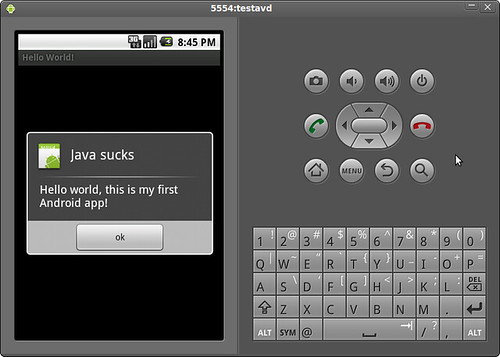
Hello, Android!

Hello, Android!

Yay, this is my first Android app! Java is really slow especially if you use Eclipse for development.  I tried this on an amd64 machine with 2GB of RAM but this simple app still crawls to a halt.  Anyway, I wish I can try this on a real phone.

Friday, February 19, 2010

Moblin, Eeebuntu 4.0 beta, etc

Just got back from Cebu GNU Linux Users Group meeting. I saw someone using Moblin. Three thumbs up! The UI is very intuitive, and will have no problems with mainstream customer adoption.

Meanwhile, Eeebuntu 4.0 is not even ready for early adopters. The installation stopped somewhere at around 95% and complained about failed GRUB setup. I'm currently downloading Ubuntu 9.10 Netbook Remix because my Eee is left with a broken OS. Let's see how this goes.

Monday, February 08, 2010

FreeBSD on Eee

I've managed to install FreeBSD 8.0 on my Eee. I was planning to install NetBSD 5.0, but I found out that I had to convert the ISO to a memory stick image before I can dd it. For some reasons, unetbootin doesn't work with NetBSD's ISOs. There's a script that converts NetBSD ISOs to memstick images, but it seems that it only works on an existing *BSD system. I could have just SSH'd into a remote NetBSD system so that I can run the script there, but I realized that the output would be too big. SSH access is a privilege and not a right; abusing it with large file transfers is a big no-no.

I tried to manually create an image using Mac OS X, but I couldn't initialize my USB stick's MBR (i.e., I couldn't boot from the USB). It says that it couldn't find "/usr/standalone/i386/boot0". I searched for it at the Mac OS X' original install discs, but I couldn't find it there either.

It is possible to install NetBSD using Mac OS X, but I was like, FreeBSD is already available as a memstick image from its FTP site. Why not use it? Thus, I downloaded it, dd'd it to my USB stick, and installed it on my Eee. Everything was straightforward.

Straightforward is boring. I'll try to recompile the kernel to see if I can further reduce its boot time (it boots less than 20sec from GRUB to login). I strongly suspect that I'll just reduce its space but not its boot time, but I'll never know until I try. I'll also try to install NetBSD via PXE, once I'm done playing with FreeBSD. I haven't tried doing it yet.

Saturday, February 06, 2010

Eeexperiments

Moblin

I've finally got around installing Moblin. I've copied the image to a USB stick and attempted to boot the OS. The boot process didn't continue though. I got the following error:
/dev/sda does not contain a rootfs
/dev/sdb does not contain a rootfs
/dev/sdc does not contain a rootfs
/dev/sdd does not contain a rootfs
I might try tweaking the kernel configs some time to see if it would work. Meanwhile, I'll just install NetBSD.

Boot Booster

Eee's BootBooster reduced the boot time by skipping the pre-boot sequence. Eeebuntu wasted installed a swap partition when I first installed it, but I never used it because I know that swapping would increase the number of writes to my Eee's SSD. Increasing the number of writes would shorten its life span. Thus, I deleted my swap and installed an EFI partition in its place. Once the BIOS detected the new partition, the BootBooster option magically appeared.

coreboot

A quick googling revealed that coreboot is unsupported on an Eee PC 701. I've also stumbled upon flashrom's source code (Linux bios flasher), and it explicitly stated that Eee PC 701 has been verified to be unsupported. Oh well.

Wednesday, January 27, 2010

HOWTO Let lighttpd listen to both IPv4 and IPv6 on *BSD.

Okay, I've managed to let lighttpd listen to both IPv4 and IPv6 requests without using IPv4-mapped addresses. According to an Internet draft, IPv4 mapped addresses are considered harmful (R.I.P., itojun :). This has already been turned off in *BSDs by default but not in Linux.

Anyway, I've found out that if sysctl net.inet6.ip6.v6only is set to 1, enabling IPv6 in lighttpd would cause it to listen to IPv6 only. To solve this, you need to use these settings:
server.use-ipv6 = "enable"
$SERVER["socket"] == "0.0.0.0:80" {
}
If you need to use SSL, simply use:
server.use-ipv6 = "enable"
ssl.engine = "enable"
ssl.pemfile = "/var/etc/cert.pem"

$SERVER["socket"] == "0.0.0.0:443" {
ssl.engine = "enable"
ssl.pemfile = "/var/etc/cert.pem"
}
Tada! It works:
root@soulfury:/# sockstat | grep lighttpd
root lighttpd 23974 4 tcp6 *:443 *:*
root lighttpd 23974 5 tcp4 *:443 *:*
root@soulfury:/# sysctl -a | grep v6only
net.inet6.ip6.v6only: 1

Moblin

I'm attempting to compile Moblin OS so that I can try it on my Eee. Moblin supposedly incorporates techniques for making Linux boot in 5 seconds, techniques which were presented on a Linux conference some time ago. According to its official site, Moblin doesn't support non-SSE3 CPUs. My Eee uses a Celeron M ULV 353 CPU, so yeah it's a non-SSE3 CPU. But what the heck, I'll go ahead and try it anyway. It's not like it's going to explode anyway. There must be some patches out there that would it enable it to work.

If it works, I'll try to use Boot Booster so that I can further shorten the time it takes to turn my PC on and load GRUB.

BTW, I'm also interested to know if coreboot works with Eee. Since I would need to mess with its ROM, there would be a real danger of bricking it, and turning it into a very expensive paper weight. Blah...

Tuesday, January 26, 2010

vimperator for Chrome

I need to have total keyboard for Chrome. I'll experiment with vimperator-like clones for Chrome...

OC

Behold, for Eee customization is such a dangerous territory. It has activated my latent OC tendencies, and now I can't sleep. Hurrrr...

Eee FSB

I'm not sure if I should overclock my Eee by default. So far, the performance is good (that is, when I switched to Chrome). I think I'll just let it be, unless I really need it since I run the risk of frying my CPU. I've already fried a CPU once... Anyway, I've found a Quicksilver clone for Linux-- it's called gnome-do. Very cool...

Eeebuntu

I've always wanted to customize my Eee PC, but I'm too lazy to do it. Anyway, I've come up with a list of usability problems that I need to fix so that I can use my Eee more effectively.
  • Unresponsive browser. At first, I tried using Opera, but I realized that its UI is very ugly, and its speed wasn't as fast as I hoped to be. I was able to solve this by replacing Firefox with Chrome. Chrome's speed can really be felt on an Eee.
  • Small screen. I've solved this by using fluxbox instead of Eeebuntu's default desktop environment, which is GNOME. I've eliminated most elements that waste screen estate, such as the window decoration, taskbar, and other stuff. I wanted to add a cool dock-like app, but I realized that it would waste screen estate and would require a mouse anyway.
  • Crappy touchpad. The solution to this problem is dependent on other solutions (i.e., using a keyboard friendly WM and app launcher). I wanted to do a touchscreen hack, but I can't find the necessary parts here in Cebu. Of course, I can always use a mouse, but it defeats the purpose of using a portable netbook. I don't want to bring a mouse wherever I go.
  • Non-straightforward way of launching apps. I'm not really a fan of Netbook Remix's UME launcher, but I realized that I need something similar to it. Perhaps I need to use something like Quicksilver (a very useful Mac OS X app that lets you run apps anywhere by simply typing its name).